
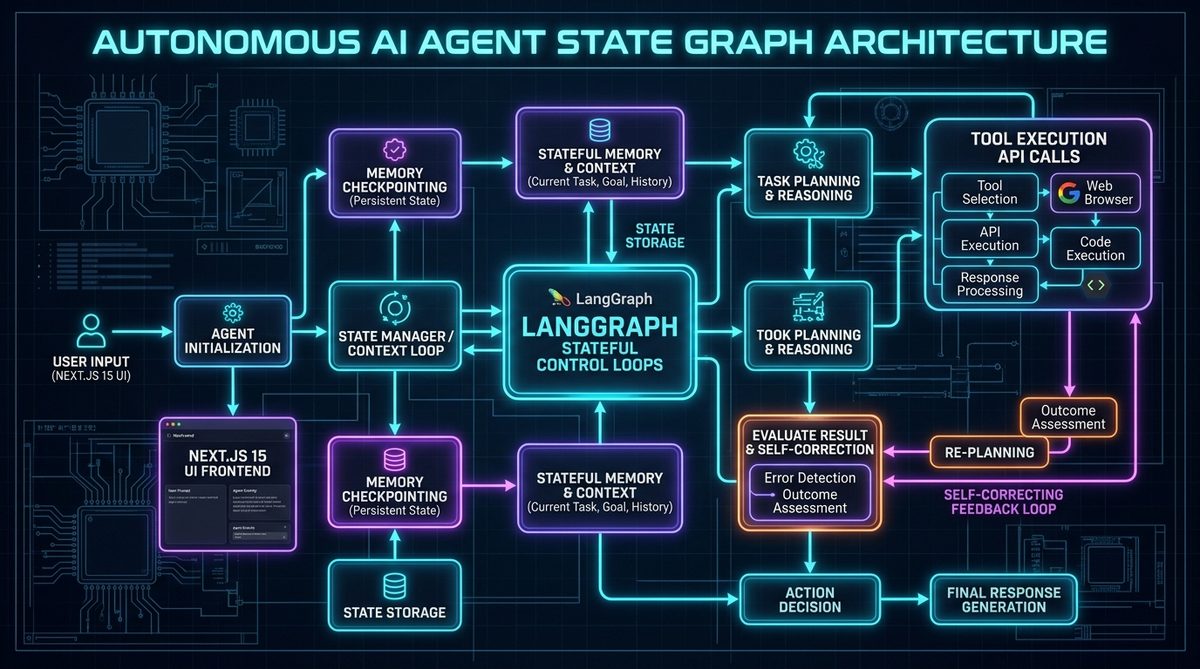
While basic LLM applications follow a simple linear sequence (Prompt -> Model -> Response), real-world enterprise tasks require dynamic planning, multi-step tool execution, state persistence, and self-correcting feedback loops.
If an AI needs to research a company, browse multiple websites, extract financial metrics, calculate year-over-year revenue growth, and generate a validated PDF report, a single prompt will fail. You need an autonomous agent architecture.
In this guide, I share how I architect stateful multi-agent workflows using LangGraph on the Python backend, integrated seamlessly with a real-time streaming UI built with Next.js 15 and TypeScript.
1. Why LangGraph Beats Legacy Linear Chains
Traditional agent frameworks (like early LangChain AgentExecutor) operated as black-box loops where developers had minimal control over transition states or error handling.
LangGraph solves this by modeling agent workflows as State Machines (Cyclic Directed Graphs):
                      ┌────────────────────────┐
                      │   1. Agent Planning    │ (Generates plan & tool selection)
                      └───────────┬────────────┘
                                  │
                                  ▼
                      ┌────────────────────────┐
                      │   2. Tool Execution    │ (Executes API, SQL query, web search)
                      └───────────┬────────────┘
                                  │
                                  ▼
                      ┌────────────────────────┐
                      │  3. Result Evaluation  │
                      └───────────┬────────────┘
                                  │
                   ┌──────────────┴──────────────┐
                   │                             │
          [Goal Achieved]              [Error / Needs More Info]
                   │                             │
                   ▼                             ▼
        ┌─────────────────────┐       ┌─────────────────────┐
        │ 4. Final Output Gen │       │ Loop back to Step 1 │
        └─────────────────────┘       └─────────────────────┘
Key Architectural Advantages:
- Explicit State Persistence: Checkpointing state in PostgreSQL/Redis allows long-running agent workflows to pause for human approval (Human-in-the-Loop) and resume without losing context.
- Cycle & Feedback Support: Agents can evaluate their own outputs, detect formatting or data errors, and re-try with corrected parameters.
- Deterministic Guardrails: You define which nodes are allowed to transition to which states, preventing unpredictable model runaway.
2. Implementing the LangGraph Backend (Python FastAPI)
Here is a simplified production pattern for a stateful research agent in Python:
from typing import TypedDict, Annotated, Sequence
import operator
from langgraph.graph import StateGraph, END
from langchain_core.messages import BaseMessage, HumanMessage, AIMessage
from langchain_anthropic import ChatAnthropic

# Define the shared state schema
class AgentState(TypedDict):
    messages: Annotated[Sequence[BaseMessage], operator.add]
    research_data: list[str]
    iteration_count: int

# Initialize model
model = ChatAnthropic(model="claude-3-5-sonnet-20241022", temperature=0.0)

def planner_node(state: AgentState) -> dict:
    """Analyze query and decide next research action."""
    messages = state["messages"]
    response = model.invoke(messages)
    return {
        "messages": [response],
        "iteration_count": state.get("iteration_count", 0) + 1
    }

def tool_node(state: AgentState) -> dict:
    """Execute external search or database query."""
    # Simulated tool execution logic
    data = "Acquired financial filings for Q3 2026."
    return {
        "messages": [HumanMessage(content=f"Tool Output: {data}")],
        "research_data": [data]
    }

def should_continue(state: AgentState) -> str:
    """Conditional edge determining whether to loop or finish."""
    if state["iteration_count"] >= 3 or "FINAL_ANSWER" in state["messages"][-1].content:
        return END
    return "execute_tool"

# Build the graph
workflow = StateGraph(AgentState)
workflow.add_node("planner", planner_node)
workflow.add_node("execute_tool", tool_node)

workflow.set_entry_point("planner")
workflow.add_conditional_edges("planner", should_continue, {
    "execute_tool": "execute_tool",
    END: END
})
workflow.add_edge("execute_tool", "planner")

app_agent = workflow.compile()
3. Real-Time Streaming UI with Next.js 15 & Server-Sent Events (SSE)
Users should never stare at a blank spinner while an agent executes multi-step tasks. In Next.js 15, we stream intermediate thoughts and tool execution logs chunk-by-chunk using Server-Sent Events (SSE):
// app/api/agent/route.ts - Next.js Edge Streaming Route
import { NextRequest } from 'next/server';

export const runtime = 'edge';

export async function POST(req: NextRequest) {
  const { prompt, sessionId } = await req.json();

  const response = await fetch(`${process.env.PYTHON_AGENT_URL}/run-agent-stream`, {
    method: 'POST',
    headers: { 'Content-Type': 'application/json' },
    body: JSON.stringify({ prompt, session_id: sessionId }),
  });

  return new Response(response.body, {
    headers: {
      'Content-Type': 'text/event-stream',
      'Cache-Control': 'no-cache',
      'Connection': 'keep-alive',
    },
  });
}
4. Production Hardening Checklist for Agentic Systems
When deploying agents for enterprise clients, ensure these five safeguards are in place:
- Max Iteration Limits: Hardcap agent loops at 5–8 iterations to prevent infinite token-draining loops.
- Tool Output Sandboxing: Never pass raw tool outputs directly to users without schema validation.
- Human-in-the-Loop Checkpoints: High-impact operations (sending emails, modifying databases, executing payments) should trigger an agent state pause requiring human 1-click confirmation in the UI.
- Token & Latency Observability: Instrument tracing with Langfuse or OpenTelemetry to monitor cost and step-by-step latency.
- Tenant Isolation: Store state with strict Row-Level Security (RLS) so session memories never cross tenant boundaries.
Build Production AI Agents for Your Company
Whether you need autonomous data research agents, automated code auditors, or multi-step customer operations workflows, building agents with state machines and typed web interfaces is the proven enterprise standard.
Looking to build custom AI agents for your startup or enterprise team?
Explore my AI engineering services, view my production case studies, or send me a message on WhatsApp to discuss your agent architecture.