
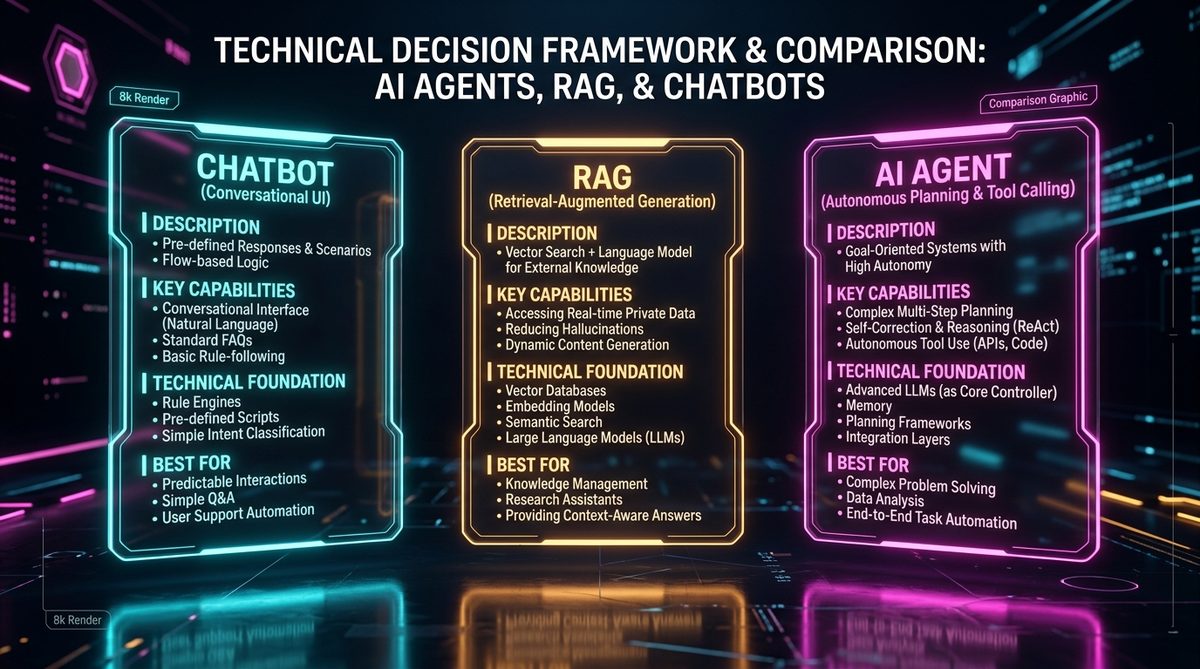
Standard chatbots built with a single static system prompt fail rapidly in production. They hallucinate non-existent features, provide outdated pricing, and cannot answer specific questions about proprietary company documents.
Retrieval-Augmented Generation (RAG) solves this by grounding the AI in your company's live, verified knowledge base.
Instead of relying on the LLM's static training memory, a RAG system dynamically retrieves relevant paragraphs from your private documentation (PDFs, helpdesk articles, database records) and provides them to the model as verified reference context before generating an answer.
As an AI Engineer & Full-Stack Developer, here is the exact production RAG architecture I implement for clients building embeddable website widgets and internal enterprise knowledge assistants.
1. High-Level RAG Architecture Pipeline
┌────────────────────────────────────────────────────────────────────────┐
│                        DATA INGESTION & INDEXING                       │
│  Raw Documents (PDFs/MD) ──► Semantic Chunking ──► Embedding Model     │
│                                                          │             │
│                                                          ▼             │
│                                               Vector Store (pgvector)  │
└────────────────────────────────────────────────────────────────────────┘
                                    │
                                    ▼
┌────────────────────────────────────────────────────────────────────────┐
│                        QUERY & GENERATION PIPELINE                     │
│  User Query ──► Vector Similarity Search ──► Re-Ranker (Cohere)       │
│                                                          │             │
│                                                          ▼             │
│  Streaming Response ◄── LLM (GPT-4o / Claude) ◄── Injected Context     │
└────────────────────────────────────────────────────────────────────────┘
2. Step 1: Document Preprocessing & Semantic Chunking
The most common mistake in RAG is using naive character-length chunking (e.g., splitting text blindly every 500 characters). This cuts sentences in half and breaks table headers.
Production Solution: Use Hierarchical Semantic Chunking:
- Split text based on Markdown headers (
#,##,###), JSON objects, or HTML DOM hierarchy. - Maintain a small chunk overlap (10–15%) to preserve context across boundaries.
- Attach rich metadata to each chunk:
document_title,url_source,last_updated,tenant_id.
// Semantic chunking interface with metadata in TypeScript
export interface DocumentChunk {
  id: string;
  content: string;
  metadata: {
    sourceUrl: string;
    category: string;
    heading: string;
    tenantId: string;
  };
  embedding?: number[];
}
3. Step 2: Vector Embeddings & Database Selection (pgvector vs. Pinecone)
In 2026, PostgreSQL with the pgvector extension is my top recommendation for 90% of web applications.
- Why pgvector:
- Keeps user accounts, session authentication, billing, and vector embeddings in a single database.
- Allows hybrid queries combining relational SQL filters and vector cosine similarity in one step.
- Zero extra vendor subscription overhead compared to dedicated vector databases.
-- Hybrid Vector Cosine Similarity Search in PostgreSQL
CREATE EXTENSION IF NOT EXISTS vector;

CREATE TABLE document_chunks (
    id UUID PRIMARY KEY DEFAULT gen_random_uuid(),
    tenant_id VARCHAR(64) NOT NULL,
    content TEXT NOT NULL,
    source_url TEXT NOT NULL,
    embedding vector(1536) -- OpenAI text-embedding-3-small dimension
);

CREATE INDEX ON document_chunks USING hnsw (embedding vector_cosine_ops);

-- Querying the top 4 most relevant chunks with tenant isolation
SELECT content, source_url, 1 - (embedding <=> $1) AS similarity
FROM document_chunks
WHERE tenant_id = $2
ORDER BY embedding <=> $1
LIMIT 4;
4. Step 3: Prompt Grounding & Strict Source Citations
To eliminate hallucinations, your system prompt must explicitly enforce grounding constraints:
SYSTEM_RAG_PROMPT = """You are the official AI knowledge assistant for {company_name}.
Answer user questions using ONLY the provided verified context chunks below.

VERIFIED CONTEXT:
{retrieved_context}

RULES:
1. If the answer cannot be found in the verified context, respond politely: "I apologize, but I don't have that specific information in my current documentation. Would you like me to connect you with a human representative?"
2. Never make up facts, pricing, or policies.
3. Always include citation links to the source documentation where applicable.
4. Format your answer with clear markdown bullet points."""
5. Step 4: Embeddable Web Widget with Next.js 15 & Streaming UI
Using Next.js 15 App Router and the Vercel AI SDK, we create an embeddable, responsive chat widget with streaming text responses (Time to First Token < 250ms):
// app/api/chat/route.ts - Next.js 15 Streaming RAG Route
import { openai } from '@ai-sdk/openai';
import { streamText } from 'ai';
import { queryVectorDatabase } from '@/lib/rag';

export const runtime = 'edge';

export async function POST(req: Request) {
  const { messages, tenantId } = await req.json();
  const latestMessage = messages[messages.length - 1].content;

  // Retrieve relevant knowledge base chunks
  const contextChunks = await queryVectorDatabase(latestMessage, tenantId);
  const contextText = contextChunks.map((c) => c.content).join('\n\n');

  const result = streamText({
    model: openai('gpt-4o-mini'),
    system: `You are a verified support assistant. Answer using ONLY this context: ${contextText}`,
    messages,
  });

  return result.toDataStreamResponse();
}
6. Business ROI: What a RAG Assistant Delivers
| Metric | Before RAG Chatbot | After RAG Deployment | | :--- | :--- | :--- | | First Response Time | 4 to 12 Hours | < 2 Seconds (24/7) | | Tier-1 Support Ticket Deflection | 0% | 65% – 80% Automated Resolution | | Lead Capture on Website | 1.2% Conversion | 3.8% Conversion via Interactive Q&A | | Customer Satisfaction (CSAT) | 78% | 94% (Instant Grounded Answers) |
Build a Custom RAG Knowledge System for Your Business
A custom RAG system turns your static company documentation into an active, 24/7 sales and customer support asset.
Ready to deploy a zero-hallucination AI assistant on your website or web app?
Explore my website chatbot development service, inspect my live projects, or send me a message on WhatsApp to discuss your documentation and RAG architecture.