
Traditional Optical Character Recognition (OCR) tools—such as Tesseract, AWS Textract, and legacy SaaS parsers like Nanonets—extract text pixel-by-pixel. They fail consistently when exposed to real-world corporate complexity:
- Non-uniform invoice layouts from hundreds of different vendors.
- Handwritten corrections, stamps, and watermarks obscuring numbers.
- Complex line-item tables spanning multiple pages with varying currency formats.
- Vendor-specific surcharge calculations and discount representations.
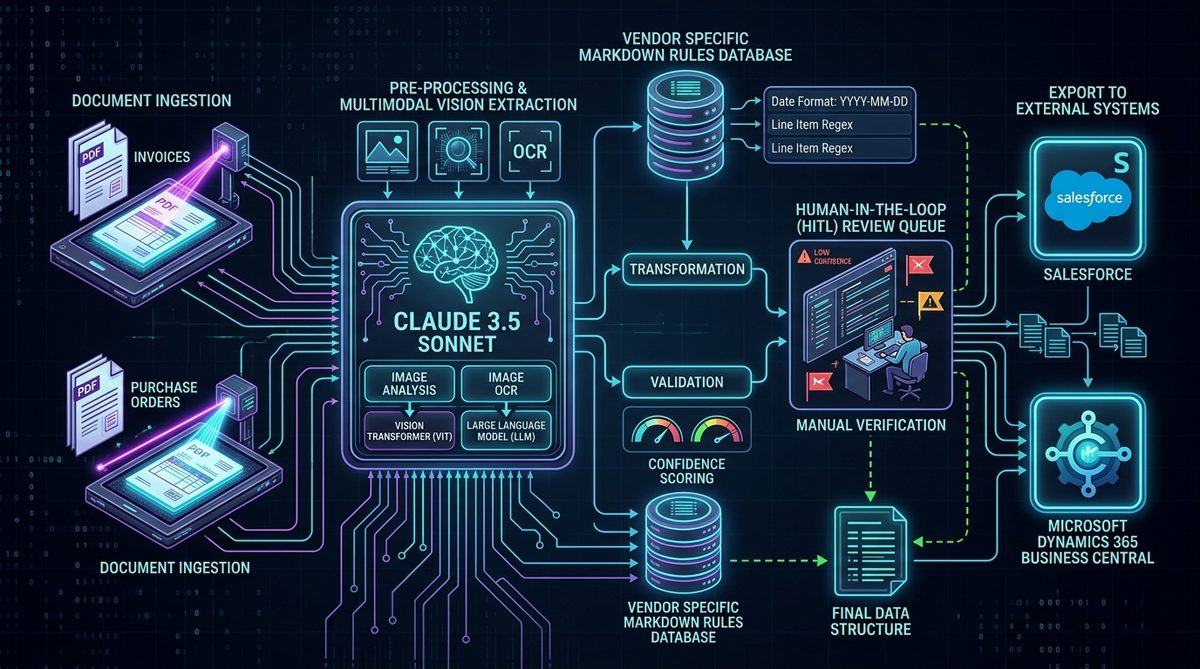
Intelligent Document Processing (IDP) solves this by combining optical preprocessing with multimodal Large Language Models (Claude Sonnet 5). Instead of rigid coordinate-based pattern matching, the model reasons over the document layout, understanding context, field hierarchy, and accounting rules simultaneously.
At Venture7 Technologies, I co-architected an enterprise IDP platform processing ~80,000 documents per month (invoices, purchase orders, statements, and equipment rental tickets) for a US-based enterprise client, successfully replacing their legacy Nanonets workflow.
Here is the complete engineering architecture and production Python code behind the system.
1. The Full Production IDP Pipeline
Document Upload (PDF / Multi-page Image via S3 / API)
    ↓
Image Normalization & Pre-processing (Python: 300 DPI, deskewing, format conversion)
    ↓
Vendor Identification (Header text lookup & metadata index)
    ↓
Dynamic Vendor Rule Injection (Loads specific Markdown extraction rules)
    ↓
Claude Sonnet 5 Multimodal Extraction (Structured JSON generation)
    ↓
Post-Processing & Deterministic Math Validation (Subtotal + Tax == Total check)
    ↓
Confidence Scoring Evaluation (0.0 to 1.0)
    ↓
┌───────────────────────────────┴───────────────────────────────┐
▼ (Confidence >= 0.88 & Valid Math)                             ▼ (Confidence < 0.88 or Math Discrepancy)
Auto-Process & Sync to ERP                                      Human-in-the-Loop (HITL) Queue
(Salesforce / Dynamics 365 Business Central)                    (Next.js 15 Operator Review Portal)
2. Step 1: Pre-Processing & Optical Normalization
Before passing documents to Claude Sonnet, optical preprocessing ensures optimal image fidelity and reduces token costs:
import base64
from PIL import Image
import io

def preprocess_document_image(file_bytes: bytes) -> str:
    """Normalize image resolution and encode to base64 for Claude Vision."""
    img = Image.open(io.BytesIO(file_bytes))

    # Convert CMYK/RGBA to RGB
    if img.mode != 'RGB':
        img = img.convert('RGB')

    # Resize if oversized while preserving aspect ratio
    max_dimension = 2048
    if max(img.size) > max_dimension:
        img.thumbnail((max_dimension, max_dimension), Image.Resampling.LANCZOS)

    buffer = io.BytesIO()
    img.save(buffer, format="PNG", quality=95)
    return base64.b64encode(buffer.getvalue()).decode('utf-8')
3. Step 2: Dynamic Vendor-Specific Markdown Rules
Rather than overloading a single system prompt with 100 vendor edge cases, we built a dynamic markdown knowledge base:
# Vendor rules database mapper
VENDOR_RULES = {
    "CAT_RENTAL": "sellers/cat_rental.md",
    "UNITED_SUPPLY": "sellers/united_supply.md",
    "DEFAULT": "sellers/default_invoice_rules.md"
}

def get_vendor_rules(detected_vendor: str) -> str:
    rule_file = VENDOR_RULES.get(detected_vendor, VENDOR_RULES["DEFAULT"])
    with open(rule_file, "r") as f:
        return f.read()
4. Step 3: Claude Sonnet 5 Multimodal Extraction
import anthropic
import json
from pydantic import BaseModel, Field

class LineItem(BaseModel):
    description: str
    quantity: float
    unit_price: float
    total_price: float

class ExtractedDocument(BaseModel):
    invoice_number: str
    invoice_date: str
    vendor_name: str
    subtotal: float
    tax_amount: float
    total_amount: float
    line_items: list[LineItem]
    confidence_score: float = Field(ge=0.0, le=1.0)

def extract_document_fields(image_b64: str, vendor_rules: str) -> ExtractedDocument:
    client = anthropic.Anthropic()

    prompt = f"""You are an enterprise document intelligence parser.
Extract all structured data from this document image.

VENDOR-SPECIFIC RULES:
{vendor_rules}

Return strictly valid JSON conforming to the schema.
Self-evaluate your extraction confidence from 0.0 to 1.0."""

    message = client.messages.create(
        model="claude-3-5-sonnet-20241022",
        max_tokens=3000,
        temperature=0.0,
        messages=[{
            "role": "user",
            "content": [
                {"type": "image", "source": {"type": "base64", "media_type": "image/png", "data": image_b64}},
                {"type": "text", "text": prompt}
            ]
        }]
    )

    raw_json = json.loads(message.content[0].text)
    return ExtractedDocument.model_validate(raw_json)
5. Step 4: Deterministic Math Validation & HITL Routing
def validate_and_route(extracted: ExtractedDocument) -> str:
    """Validate arithmetic totals and route to auto-process or human review."""
    calculated_subtotal = sum(item.quantity * item.unit_price for item in extracted.line_items)
    calculated_total = extracted.subtotal + extracted.tax_amount

    # Check for arithmetic discrepancies greater than 2 cents
    math_valid = abs(calculated_total - extracted.total_amount) <= 0.02

    if extracted.confidence_score >= 0.88 and math_valid:
        return "AUTO_PROCESS"
    else:
        return "HUMAN_REVIEW_QUEUE"
6. Enterprise Results at Scale
Deploying this pipeline at Venture7 achieved:
- 80,000+ documents processed monthly across invoices, POs, and statements.
- 92% Auto-Processing Rate passing directly into Microsoft Dynamics 365 Business Central and Salesforce without human touch.
- 8% Exception Rate routed to the Next.js HITL portal for fast 10-second operator corrections.
- 65%+ cost reduction compared to legacy per-page OCR SaaS subscriptions.
Build a Custom IDP Pipeline for Your Company
If your operations team spends dozens of hours every week manually entering data from invoices, shipping documents, or medical records, a custom Document AI system will immediately reduce costs and errors.
Have a high-volume document workflow you want to automate?
Explore my AI automation services, inspect my IDP case study, or send me a message on WhatsApp for a technical consultation.