
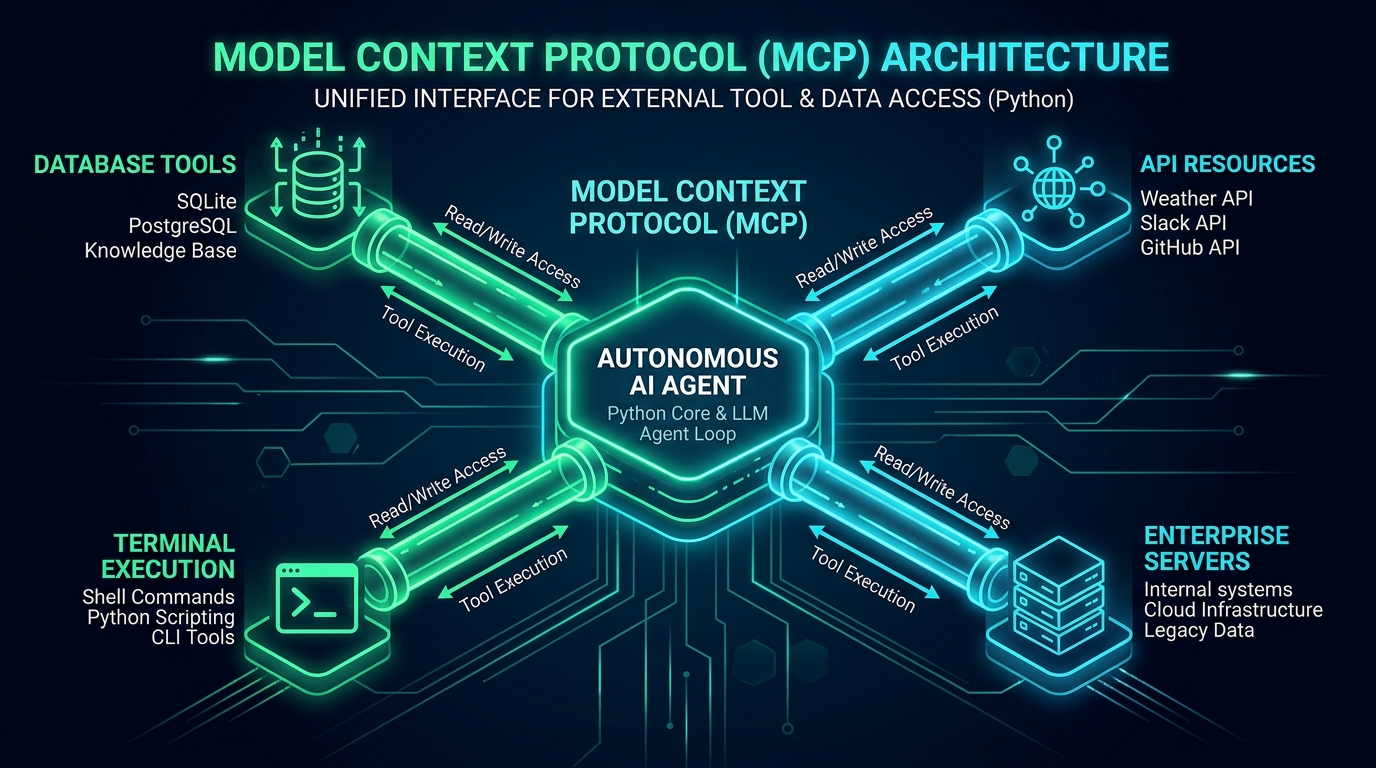
The biggest bottleneck in scaling agentic AI has never been model intelligence—it has been tool interoperability.
Until recently, every AI developer had to invent custom function-calling wrappers, maintain bespoke REST endpoints, and hardcode JSON schemas into prompt templates. If you wanted Claude, ChatGPT, or an internal LangGraph agent to query your PostgreSQL database, run a shell command, or inspect customer orders in your ERP, you had to rewrite integration adapters for every single framework.
Anthropic's Model Context Protocol (MCP) changes this fundamentally. By establishing an open, standardized protocol for how AI models discover tools, read resources, and execute functions, MCP is becoming the USB-C standard for artificial intelligence.
In this guide, we will break down the exact architecture of building, securing, and deploying a production-ready Python MCP server that provides enterprise tools to autonomous AI agents.
1. How Model Context Protocol Works: The Core Architecture
At its foundation, MCP operates on a client-server architecture using JSON-RPC 2.0 messages over two primary transport layers:
- Standard I/O (
stdio): Ideal for local agent environments, desktop copilots (like Claude Desktop or local developer IDEs), and CLI tools where the host spawns the MCP server as a sub-process. - Server-Sent Events (
SSE) over HTTP: Essential for remote enterprise deployments, microservices running in Docker/Kubernetes, and cloud-hosted agentic backends.
┌────────────────────────────────────────────────────────────────────────┐
│                        MCP HOST (e.g. Claude / Agent Core)             │
│   • Manages conversation context                                       │
│   • Determines when to invoke tools                                    │
│   • Enforces security permissions & user confirmations                 │
└───────────────────────────────────┬────────────────────────────────────┘
                                    │ JSON-RPC 2.0 (stdio or SSE)
                                    ▼
┌────────────────────────────────────────────────────────────────────────┐
│                        MCP PYTHON SERVER CORE                          │
│                                                                        │
│   ┌─────────────────────┐   ┌───────────────────┐   ┌──────────────┐   │
│   │    TOOLS (Actions)  │   │ RESOURCES (Data)  │   │   PROMPTS    │   │
│   │  • query_database   │   │  • schema://main  │   │  • triage    │   │
│   │  • parse_invoice    │   │  • file://logs    │   │  • audit     │   │
│   │  • trigger_workflow │   │                   │   │              │   │
│   └──────────┬──────────┘   └─────────┬─────────┘   └───────┬──────┘   │
└──────────────┼────────────────────────┼─────────────────────┼──────────┘
               │                        │                     │
               ▼                        ▼                     ▼
        Enterprise DB             Cloud Storage          Enterprise ERP
      (PostgreSQL / Redis)       (S3 / File Vault)      (Salesforce / BC)
The Three MCP Primitives
- Tools: Callable functions with structured inputs that take action and return output (e.g.
execute_query(sql: str)). - Resources: Read-only data endpoints that an agent can attach to its context window (e.g. documentation, schema definitions, logs).
- Prompts: Pre-defined prompt templates that guide agents through standardized organizational workflows.
2. Building a Production Python MCP Server
Let's build an enterprise database and document management MCP server using Python's official mcp SDK and Pydantic.
Installing Dependencies
pip install mcp pydantic psycopg2-binary uvicorn fastapi
Server Implementation (server.py)
import asyncio
from typing import Any, Sequence
from mcp.server import Server
from mcp.server.stdio import stdio_server
from mcp.types import (
    Tool,
    TextContent,
    ImageContent,
    EmbeddedResource,
)
from pydantic import BaseModel, Field

# Initialize the MCP Server instance
app = Server("enterprise-analytics-mcp")

# Define Input Schemas using Pydantic
class DatabaseQueryInput(BaseModel):
    query: str = Field(description="Safe SQL SELECT query to execute against the analytics database.")
    max_rows: int = Field(default=50, description="Maximum number of rows to return.")

class DocumentTriageInput(BaseModel):
    document_id: str = Field(description="Unique UUID of the document to inspect.")
    department: str = Field(description="Target business unit (e.g. 'accounting', 'legal').")

# 1. Register Available Tools with the Agent
@app.list_tools()
async def list_tools() -> list[Tool]:
    return [
        Tool(
            name="query_analytics_db",
            description="Executes a read-only SQL SELECT query to retrieve sales, client, and document statistics.",
            inputSchema=DatabaseQueryInput.model_json_schema(),
        ),
        Tool(
            name="triage_document",
            description="Analyzes an uploaded invoice or contract, verifies vendor authenticity, and flags discrepancies.",
            inputSchema=DocumentTriageInput.model_json_schema(),
        ),
    ]

# 2. Tool Execution Dispatcher
@app.call_tool()
async def call_tool(name: str, arguments: dict[str, Any]) -> Sequence[TextContent | ImageContent | EmbeddedResource]:
    if name == "query_analytics_db":
        args = DatabaseQueryInput.model_validate(arguments)

        # Enforce Security Guardrails: Disallow destructive SQL mutations
        normalized_sql = args.query.strip().upper()
        if not normalized_sql.startswith("SELECT"):
            return [TextContent(type="text", text="Error: Only read-only SELECT queries are authorized by policy.")]

        # Simulated safe query execution (Replace with connection pool)
        simulated_data = [
            {"client_id": "US-102", "monthly_documents": 14200, "status": "active"},
            {"client_id": "AE-840", "monthly_documents": 8400, "status": "active"},
        ]

        return [TextContent(type="text", text=f"Query executed successfully ({len(simulated_data)} rows returned):\n{simulated_data}")]

    elif name == "triage_document":
        args = DocumentTriageInput.model_validate(arguments)
        # Process document logic
        result = {
            "document_id": args.document_id,
            "department": args.department,
            "status": "APPROVED",
            "extracted_total": 4500.00,
            "risk_score": 0.02,
        }
        return [TextContent(type="text", text=f"Document Triage Completed:\n{result}")]

    raise ValueError(f"Unknown tool requested: {name}")

# 3. Main Stdio Event Loop
async def main():
    async with stdio_server() as (read_stream, write_stream):
        await app.run(
            read_stream,
            write_stream,
            app.create_initialization_options(),
        )

if __name__ == "__main__":
    asyncio.run(main())
3. Exposing Tools Over SSE for Cloud Deployments
While stdio is ideal for local tools, production cloud agents (running in AWS ECS, Kubernetes, or Vercel edge functions) require Server-Sent Events (SSE) over HTTPS.
Using FastAPI and the Starlette transport from the MCP Python SDK, we can expose endpoints that any remote LLM client can connect to securely:
# sse_server.py
from fastapi import FastAPI, Depends, HTTPException, Security
from fastapi.security.api_key import APIKeyHeader
from mcp.server.sse import SseServerTransport
from starlette.requests import Request
from starlette.responses import Response

app = FastAPI(title="Enterprise Cloud MCP Gateway")
API_KEY_HEADER = APIKeyHeader(name="X-MCP-API-KEY")
VALID_API_KEY = "sk-mcp-enterprise-secret-key-2026"

sse = SseServerTransport("/messages/")

async def verify_api_key(api_key: str = Security(API_KEY_HEADER)):
    if api_key != VALID_API_KEY:
        raise HTTPException(status_code=403, detail="Unauthorized MCP connection attempt.")
    return api_key

@app.get("/sse", dependencies=[Depends(verify_api_key)])
async def handle_sse(request: Request):
    async with sse.connect_sse(
        request.scope, request.receive, request._send
    ) as streams:
        await mcp_server.run(
            streams[0], streams[1], mcp_server.create_initialization_options()
        )

@app.post("/messages/", dependencies=[Depends(verify_api_key)])
async def handle_messages(request: Request):
    await sse.handle_post_message(request.scope, request.receive, request._send)
4. Production Security & Agent Safety Guardrails
When granting an LLM access to external tools, security cannot be an afterthought:
- Strict Input Validation via Pydantic: Never pass unvalidated model outputs directly to raw bash commands, file system paths, or SQL engines. Use strict Pydantic schemas with regex constraints.
- Read-Only Database Roles: Connect the MCP server to database replicas using dedicated read-only credentials with strict row-level security (RLS).
- Execution Latency Budgeting: Set explicit timeouts on tool executions. If an external API or query hangs for more than 5 seconds, abort the execution with a timeout message so the agent can self-correct or report the error rather than deadlocking.
- Human-in-the-Loop (HITL) Triggers: For high-impact actions (e.g. issuing supplier payments, modifying user credentials, or deleting records), the MCP server should return a pending confirmation token requiring human authorization before committing.
Conclusion & Next Steps
The Model Context Protocol is standardizing how production AI agents perceive and interact with enterprise software. By building modular, typed MCP servers in Python, teams can unlock agentic reasoning without locking themselves into proprietary platform silos.
Explore our related work on Autonomous Agent Architectures, check out our AI Automation Services, or connect with me directly to architect custom MCP tools and agentic pipelines for your business.